
The Google UX Design Professional Certificate is one of the most popular searches among aspiring UX designers, creative professionals, and career switchers looking to enter the fast-growing field of User Experience (UX) Design. Developed by Google and delivered through Coursera, this beginner-friendly certificate is designed to teach practical UX design skills without requiring a degree or previous design experience.
As businesses increasingly focus on creating intuitive digital experiences, the demand for UX designers continues to grow across industries such as technology, healthcare, banking, e-commerce, education, and entertainment. Companies are actively seeking professionals who can design products that are user-friendly, accessible, and visually appealing.
Unlike traditional design courses that emphasize theory, the Google UX Design Professional Certificate focuses on hands-on learning through real-world projects, case studies, wireframes, prototypes, and portfolio development.
In this comprehensive review, we’ll explore the curriculum, cost, duration, portfolio projects, career opportunities, salaries, advantages, disadvantages, and whether the Google UX Design Professional Certificate is worth pursuing in 2026.
Table of Contents
Quick Overview
| Feature | Details |
|---|---|
| Provider | |
| Learning Platform | Coursera |
| Level | Beginner |
| Duration | 4–6 Months |
| Learning Mode | Self-paced |
| Portfolio Projects | Yes |
| Final Exam | No |
| Certificate Awarded | Google Career Certificate |
| Prerequisites | None |
| Best For | Beginners, career switchers, aspiring UX designers |
What Is the Google UX Design Professional Certificate?
The Google UX Design Professional Certificate is an online training program that prepares learners for entry-level UX design roles.
The program covers the complete UX design process, including:
- User research
- User personas
- Information architecture
- Wireframing
- Prototyping
- Usability testing
- Accessibility
- Responsive design
- Portfolio development
Rather than focusing solely on theory, learners complete multiple practical projects that simulate real-world UX design work.
By the end of the program, learners build a professional portfolio showcasing their design skills, which can be shared with potential employers.
Why Learn UX Design in 2026?
User experience has become a critical component of digital product development. Whether it’s a mobile app, website, banking application, healthcare portal, or e-commerce platform, organizations need UX designers to create intuitive and engaging experiences for users.
Some key reasons to learn UX design include:
- High demand across industries
- Excellent salary potential
- Remote and freelance opportunities
- Creative and analytical career path
- Opportunity to build a strong design portfolio
- Transferable skills across multiple domains
UX design combines creativity, problem-solving, psychology, and technology, making it an exciting career for individuals who enjoy improving digital experiences.
Who Should Take This Certificate?
The Google UX Design Professional Certificate is ideal for:
- Students
- Fresh graduates
- Career changers
- Graphic designers
- UI designers
- Front-end developers
- Product enthusiasts
- Digital marketers
- Anyone interested in user-centered design
The program is especially suitable for learners who want a structured introduction to UX design without prior industry experience.
Who Should Avoid This Certificate?
This certificate may not be the best choice if you:
- Already work as an experienced UX designer.
- Have an advanced design portfolio.
- Hold senior UX or product design roles.
- Need specialized training in advanced UX research or interaction design.
Experienced professionals may benefit more from advanced UX courses or specialized certifications.
Prerequisites
One of the biggest strengths of the Google UX Design Professional Certificate is that there are no formal prerequisites.
You only need:
- Basic computer skills
- Internet access
- A laptop or desktop
- Creativity and curiosity
- Willingness to learn
No design degree is required.
No programming experience is required.
No previous UX experience is required.
Course Curriculum
The certificate consists of multiple courses that guide learners through the UX design process.
| Course | Topics Covered |
|---|---|
| Foundations of UX Design | UX principles, design thinking, career paths |
| Start the UX Design Process | User research, empathy, personas |
| Build Wireframes and Low-Fidelity Prototypes | Sketching, information architecture, wireframing |
| Conduct UX Research | User interviews, usability testing, feedback |
| Create High-Fidelity Designs | Interactive prototypes, visual design |
| Responsive Web Design | Designing across multiple devices |
| Design Portfolio | Capstone projects and portfolio presentation |
The curriculum emphasizes learning by doing, with each course contributing to a professional UX portfolio.
Skills You’ll Learn
After completing the program, you’ll develop expertise in key UX design concepts.
UX Fundamentals
- Design Thinking
- User-Centered Design
- Accessibility
- Information Architecture
- User Flows
User Research
- User Interviews
- Surveys
- Personas
- Journey Mapping
- Empathy Mapping
Wireframing
- Low-Fidelity Wireframes
- Layout Design
- Navigation Design
- User Flows
Prototyping
- Interactive Prototypes
- Clickable Mockups
- User Testing
- Design Iteration
Usability Testing
- Planning usability studies
- Collecting feedback
- Analyzing user behavior
- Improving product usability
Design Tools You’ll Learn
The certificate introduces learners to industry-standard UX design tools, including:
- Figma
- Adobe XD (conceptually)
- Google Workspace
- Miro
- Wireframing tools
- Prototyping platforms
Although Figma is the primary design tool used throughout the program, the design principles can be applied using other UX software as well.
Portfolio Projects
One of the biggest advantages of the Google UX Design Professional Certificate is its strong focus on portfolio development.
Throughout the program, you’ll create projects such as:
- Mobile app designs
- Responsive websites
- User personas
- User journey maps
- Wireframes
- Interactive prototypes
- Usability study reports
- Case studies
By the end of the course, you’ll have a professional portfolio that demonstrates your UX design process and practical skills to potential employers.
Learning Format
The Google UX Design Professional Certificate combines several learning methods.
You’ll complete:
- Video lessons
- Interactive quizzes
- Reading assignments
- Practical design exercises
- Portfolio projects
- Peer-reviewed assignments
- Hands-on design activities
The self-paced format makes it suitable for students, working professionals, and career changers.
Course Duration
Google recommends studying approximately 10 hours per week.
| Weekly Study Time | Estimated Completion |
|---|---|
| 5 Hours | 6 Months |
| 10 Hours | 4–5 Months |
| 15 Hours | 3 Months |
| 20 Hours | 2 Months |
Many learners complete the certificate within three to four months while balancing work or studies.
Certification Cost
The Google UX Design Professional Certificate is offered through Coursera’s monthly subscription model.
| Item | Details |
|---|---|
| Platform | Coursera |
| Payment Model | Monthly subscription |
| Financial Aid | Available for eligible learners |
| Free Trial | Usually available for new users |
As subscription pricing may vary by region and promotional offers, always verify the latest pricing on Coursera before enrolling.
Is There a Certification Exam?
Unlike certifications such as PMP or AWS Certified Cloud Practitioner, the Google UX Design Professional Certificate does not include a single proctored certification exam.
Instead, learners complete:
- Module quizzes
- Design assignments
- Portfolio projects
- Peer-reviewed exercises
- Practical case studies
- Capstone project
After successfully completing all required coursework, learners receive the Google UX Design Professional Certificate.
Difficulty Level
| Topic | Difficulty |
|---|---|
| UX Fundamentals | ⭐⭐☆☆☆ |
| User Research | ⭐⭐⭐☆☆ |
| Wireframing | ⭐⭐⭐☆☆ |
| Prototyping | ⭐⭐⭐☆☆ |
| Usability Testing | ⭐⭐⭐☆☆ |
| Portfolio Development | ⭐⭐⭐⭐☆ |
Overall Difficulty: 2.5/5
The Google UX Design Professional Certificate is designed specifically for beginners. While learning design tools like Figma and creating a polished portfolio may take additional practice, the structured curriculum makes it approachable even for those without prior design experience.
Salary After the Google UX Design Professional Certificate (India – 2026)
Completing the Google UX Design Professional Certificate can help you qualify for entry-level UX and product design roles. Salaries vary based on your portfolio, location, industry, and experience.
| Job Role | Average Salary (India) |
|---|---|
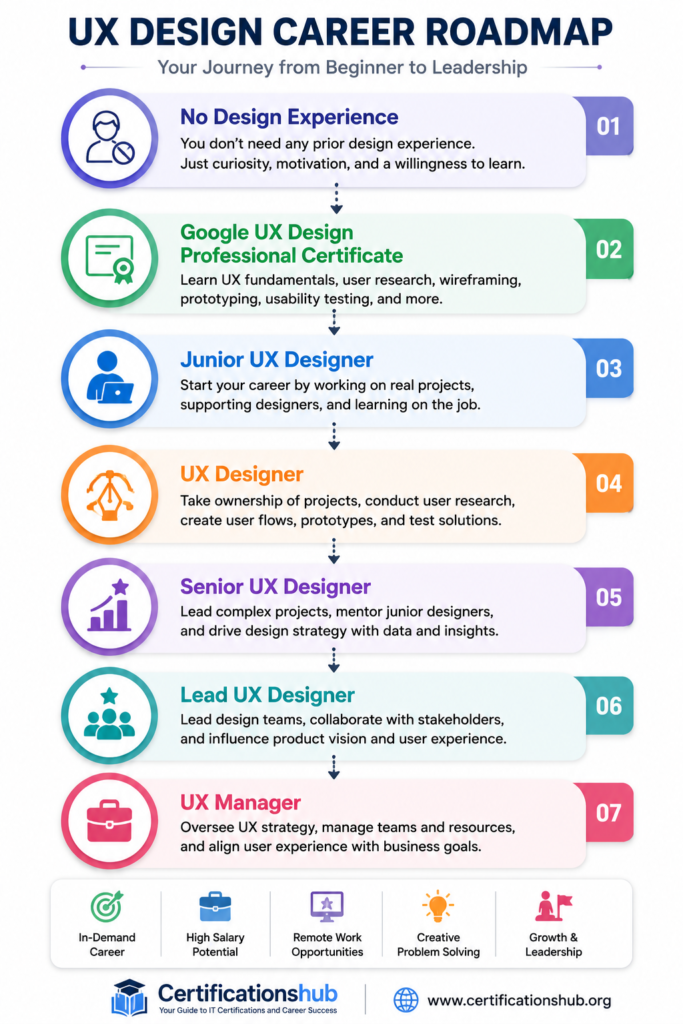
| Junior UX Designer | ₹5 – ₹8 LPA |
| UX Designer | ₹8 – ₹15 LPA |
| UI/UX Designer | ₹8 – ₹16 LPA |
| Product Designer | ₹10 – ₹18 LPA |
| Senior UX Designer | ₹15 – ₹25 LPA |
| UX Manager | ₹25 – ₹40+ LPA |
Pro Tip: A strong portfolio often has a greater impact on UX hiring than certificates alone. Employers typically evaluate your design process, case studies, and problem-solving skills alongside your certification.
Global Salary Outlook
| Country | Typical Annual Salary |
|---|---|
| United States | $75,000 – $120,000 |
| Canada | CAD 70,000 – CAD 110,000 |
| United Kingdom | £45,000 – £75,000 |
| Australia | AUD 85,000 – AUD 130,000 |
Career Opportunities
UX design skills are in demand across industries because organizations want to create products that are intuitive, accessible, and user-friendly.
After completing the certificate, you may pursue roles such as:
- Junior UX Designer
- UX Designer
- UI/UX Designer
- Product Designer
- UX Researcher
- Interaction Designer
- Visual Designer
- Information Architect
- Design Consultant
With experience, you can advance into leadership roles such as Lead UX Designer, UX Manager, Head of Design, or Director of User Experience.
Career Roadmap
Skills Employers Look For
Technical Skills
- User Research
- Wireframing
- Prototyping
- Figma
- Information Architecture
- Usability Testing
- Design Systems
- Responsive Design
- Accessibility
- Interaction Design
Soft Skills
- Empathy
- Communication
- Creativity
- Critical Thinking
- Collaboration
- Presentation Skills
- Problem Solving
- Stakeholder Management
Advantages of the Google UX Design Professional Certificate
Pros
- Beginner friendly
- No design experience required
- Strong emphasis on portfolio development
- Hands-on projects throughout the course
- Self-paced learning
- Affordable monthly subscription
- Introduces industry-standard UX processes
- Covers Figma and modern UX workflows
Disadvantages
Cons
- Not a substitute for professional work experience
- Requires time to build a strong portfolio
- Limited focus on advanced UX research techniques
- Some employers may prioritize experience over certificates
- Continuous practice is essential to remain competitive
Google UX Design vs UI Design
| Feature | Google UX Design | UI Design |
|---|---|---|
| Focus | User experience and usability | Visual interface design |
| User Research | ✔ Extensive | Limited |
| Wireframing | ✔ Yes | Basic |
| Prototyping | ✔ Yes | ✔ Yes |
| Typography | Basic | Extensive |
| Color Theory | Basic | Extensive |
| User Testing | ✔ Yes | Limited |
| Best For | Product experience | Visual interface creation |
Which Should You Choose?
Choose UX Design if you:
- Enjoy solving user problems.
- Like conducting research and usability testing.
- Want to improve product experiences.
- Prefer analytical and creative work.
Choose UI Design if you:
- Enjoy visual creativity.
- Like designing layouts and interfaces.
- Want to focus on branding and aesthetics.
- Are interested in typography and color systems.
Many professionals eventually develop both UX and UI skills.
Google UX Design vs Google Project Management
| Feature | Google UX Design | Google Project Management |
|---|---|---|
| Career Path | UX Design | Project Management |
| Creativity | High | Moderate |
| Technical Design | High | Low |
| Team Leadership | Moderate | High |
| Portfolio Required | Yes | No |
| Best For | Designers | Coordinators and Managers |
8-Week Study Plan
| Week | Topics |
|---|---|
| Week 1 | UX fundamentals and design thinking |
| Week 2 | User research and personas |
| Week 3 | Information architecture and user flows |
| Week 4 | Wireframing |
| Week 5 | Prototyping with Figma |
| Week 6 | Usability testing |
| Week 7 | Responsive design and accessibility |
| Week 8 | Portfolio development and capstone project |
Studying 8–10 hours per week is generally enough to complete the certificate in about two months.
Best Learning Resources
Official Resources
- Google Career Certificates
- Coursera
Supplementary Resources
- Figma Learn
- Nielsen Norman Group (NN/g)
- Material Design Guidelines
- UX Collective
- Interaction Design Foundation
- Adobe XD tutorials
- Dribbble
- Behance
Preparation Tips
- Complete every portfolio project.
- Practice using Figma daily.
- Study popular mobile and web applications.
- Learn accessibility principles.
- Conduct usability testing with real users.
- Publish your portfolio on Behance or a personal website.
- Read UX case studies regularly.
- Stay updated with modern design trends.
Common Mistakes to Avoid
- Copying existing designs without understanding user needs.
- Skipping user research.
- Ignoring accessibility.
- Creating portfolios without explaining the design process.
- Focusing only on visuals instead of usability.
- Not seeking feedback on your designs.
- Expecting the certificate alone to secure a UX job.
Is the Google UX Design Professional Certificate Worth It in 2026?
It is worth it if:
- You are new to UX design.
- You want to build a professional portfolio.
- You enjoy creative problem-solving.
- You are considering a career change into design.
- You prefer project-based learning over exam preparation.
It may not be worth it if:
- You already have extensive UX experience.
- You possess a strong professional portfolio.
- You are looking for advanced specialization in UX research or interaction design.
Final Verdict
The Google UX Design Professional Certificate is one of the best beginner-friendly UX design programs available in 2026. It combines structured lessons, hands-on projects, and portfolio development to prepare learners for entry-level UX design roles.
Unlike theory-focused courses, this certificate emphasizes practical design thinking, user research, wireframing, prototyping, and usability testing. The opportunity to build a professional portfolio is one of its biggest strengths, as portfolios play a crucial role in UX hiring.
If you’re looking to start a career in UX design, transition into product design, or build a solid foundation before pursuing advanced UX training, the Google UX Design Professional Certificate is a worthwhile investment.
Key Takeaways
- Designed for complete beginners.
- No prior design experience required.
- Strong emphasis on portfolio creation.
- Covers user research, Figma, wireframing, and prototyping.
- Flexible self-paced learning through Coursera.
- Excellent starting point for a UX design career.
Related Articles
Refer to other relevant articles:
- Google Project Management Certificate Review
- Google Cybersecurity Professional Certificate Review
- Google IT Support Professional Certificate Review
- Google Data Analytics Professional Certificate Review
- Best IT Certifications for Beginners
- Best Google Certifications for Beginners
- Are Google Career Certificates Worth It?
- Career Change to IT Without a Degree.
Frequently Asked Questions (FAQs)
Is the Google UX Design Professional Certificate recognized by employers?
Yes. Many employers recognize Google Career Certificates as evidence of foundational UX design knowledge, especially for entry-level positions. However, your portfolio remains one of the most important factors during the hiring process.
Can I get a UX designer job after completing this certificate?
Yes, it can help you qualify for junior UX or UI/UX roles. A well-developed portfolio, practical projects, and interview preparation significantly improve your chances.
Does the certificate expire?
No. The Google UX Design Professional Certificate does not have an expiration date.
Do I need coding skills?
No. Programming knowledge is not required, although understanding basic HTML and CSS can be beneficial as your career progresses.
Is Figma included in the course?
Yes. The course uses Figma extensively for wireframing, prototyping, and interface design.