

Introduction
The Google IT Support Professional Certificate Review is one of the first questions aspiring IT professionals ask when looking for an entry-level certification. Developed by Google and delivered through Coursera, this beginner-friendly program is designed to help individuals with little or no technical background prepare for roles such as IT Support Specialist, Help Desk Technician, and Desktop Support Engineer.
Unlike traditional certification exams, this is a professional certificate program that combines video lessons, quizzes, hands-on labs, and practical projects. It focuses on building real-world IT support skills rather than preparing learners for a single proctored exam.
In this comprehensive review, we’ll cover everything you need to know, including the course structure, cost, duration, curriculum, career opportunities, salaries, advantages, disadvantages, and whether it’s worth your time and money in 2026.
Key Takeaways
- Beginner-friendly with no prerequisites.
- Covers hardware, networking, Linux, security, and troubleshooting.
- Includes hands-on labs and practical exercises.
- Suitable for career changers and students.
- Can lead to entry-level IT support roles.
- Serves as a strong foundation for advanced certifications like CompTIA A+, AWS Cloud Practitioner, and ServiceNow CSA.
Table of Contents
Quick Overview
| Feature | Details |
|---|---|
| Provider | |
| Platform | Coursera |
| Level | Beginner |
| Duration | 3–6 months (self-paced) |
| Exams | Course assessments and quizzes |
| Hands-on Labs | Yes |
| Prerequisites | None |
| Certificate | Google Career Certificate |
| Best For | Beginners and career switchers |
What Is the Google IT Support Professional Certificate?
The Google IT Support Professional Certificate is an online training program created by Google to prepare learners for entry-level IT support roles.
The program covers essential topics such as:
- Computer hardware
- Operating systems
- Networking
- System administration
- Security fundamentals
- Troubleshooting
- Customer support
- Linux basics
Instead of memorizing theory, learners gain practical experience through guided labs and real-world scenarios.
Who Should Take This Certificate?
This certificate is ideal for:
- Students exploring IT careers
- Fresh graduates
- Career changers
- Non-technical professionals
- Help Desk aspirants
- Desktop Support Engineers
- Technical Support Executives
- Anyone without a Computer Science degree
It is especially suitable for those looking to enter the IT industry without prior experience.
Who Should Avoid It?
This certificate may not be the best choice if you:
- Already have several years of IT support experience
- Hold advanced certifications such as CompTIA A+, Microsoft certifications, or Cisco certifications
- Are targeting specialized roles like Cloud Architect, Cybersecurity Engineer, or DevOps Engineer
Experienced professionals may benefit more from advanced certifications aligned with their career goals.
Prerequisites
One of the biggest strengths of this program is that there are no formal prerequisites.
You only need:
- Basic computer literacy
- Internet connection
- A laptop or desktop
- Willingness to learn
No programming knowledge is required.
No college degree is required.
No IT background is required.
Course Curriculum
The certificate consists of five comprehensive courses.
| Course | Topics Covered |
|---|---|
| Technical Support Fundamentals | Hardware, software, troubleshooting |
| The Bits and Bytes of Computer Networking | TCP/IP, DNS, routers, switches |
| Operating Systems and You | Windows, Linux, file systems |
| System Administration and IT Infrastructure Services | Servers, Active Directory, virtualization |
| IT Security | Authentication, encryption, security best practices |
Each course includes:
- Video lectures
- Reading material
- Interactive quizzes
- Hands-on labs
- Practice exercises
- Final assessments
Skills You’ll Learn
By the end of the program, you’ll understand:
Hardware
- PCs
- Motherboards
- RAM
- CPUs
- Storage devices
- Peripherals
Operating Systems
- Windows
- Linux
- Command Line
- File Systems
- Process Management
Networking
- IP Addressing
- DNS
- DHCP
- Routers
- Switches
- Firewalls
Security
- Authentication
- Encryption
- Malware
- Access Control
- Security Policies
Troubleshooting
- Incident Resolution
- Root Cause Analysis
- Ticketing Systems
- Customer Communication
Learning Format
Unlike traditional certifications, learning is entirely online.
You get access to:
- Video lessons
- Reading materials
- Interactive labs
- Guided projects
- Assessments
- Discussion forums
The self-paced format allows learners to study evenings or weekends without leaving their current job.
Duration
Google estimates approximately 10 hours per week.
Typical completion times are:
| Study Hours | Completion Time |
|---|---|
| 5 hrs/week | 6 months |
| 10 hrs/week | 3–4 months |
| 20 hrs/week | 6–8 weeks |
Many motivated learners complete the program within three months.
Certification Cost
The program is available through Coursera’s subscription model.
| Item | Approximate Cost |
|---|---|
| Coursera Subscription | Monthly subscription |
| Financial Aid | Available for eligible learners |
| Free Trial | Usually available for new users |
Since pricing may change by region and promotions, always check the official Coursera page before enrolling.
Is There an Exam?
Unlike certifications such as AWS Certified Cloud Practitioner or CompTIA A+, there is no single final proctored exam.
Instead, learners complete:
- Module quizzes
- Hands-on labs
- Assignments
- Course assessments
- Final graded activities
After successfully completing all required coursework, you receive the Google IT Support Professional Certificate.
Difficulty Level
| Area | Difficulty |
|---|---|
| Computer Basics | Easy |
| Networking | Moderate |
| Linux Commands | Moderate |
| Security | Moderate |
| Troubleshooting | Moderate |
Overall Difficulty: 2.5/5
The program is designed specifically for beginners, making it accessible without prior technical experience.
Salary After the Google IT Support Professional Certificate (India – 2026)
While the certificate itself does not guarantee a job or salary, it equips learners with practical skills that can help them qualify for entry-level IT support roles. Salaries vary based on location, employer, experience, and additional certifications.
| Job Role | Average Salary (India) |
|---|---|
| IT Support Technician | ₹3 – ₹5 LPA |
| Help Desk Analyst | ₹3.5 – ₹6 LPA |
| Desktop Support Engineer | ₹4 – ₹7 LPA |
| Technical Support Engineer | ₹4 – ₹8 LPA |
| System Administrator (with experience) | ₹6 – ₹10 LPA |
| Cloud Support Associate | ₹8 – ₹15 LPA |
Tip: Pairing this certificate with practical experience and certifications like AWS Cloud Practitioner or CompTIA A+ can significantly improve your earning potential.
Global Salary Outlook
| Country | Typical Annual Salary |
|---|---|
| United States | $45,000 – $70,000 |
| Canada | CAD 45,000 – CAD 70,000 |
| United Kingdom | £25,000 – £40,000 |
| Australia | AUD 55,000 – AUD 80,000 |
* Actual salaries depend on experience, company, and region.
Career Opportunities
Completing the Google IT Support Professional Certificate can open doors to various entry-level IT roles.
Common Job Titles
- IT Support Specialist
- Help Desk Technician
- Desktop Support Engineer
- Technical Support Associate
- Service Desk Analyst
- Junior System Administrator
- IT Operations Associate
- Field Support Technician
Many organizations value practical troubleshooting skills, customer service, and foundational IT knowledge—all of which are covered in this program.
Career Progression
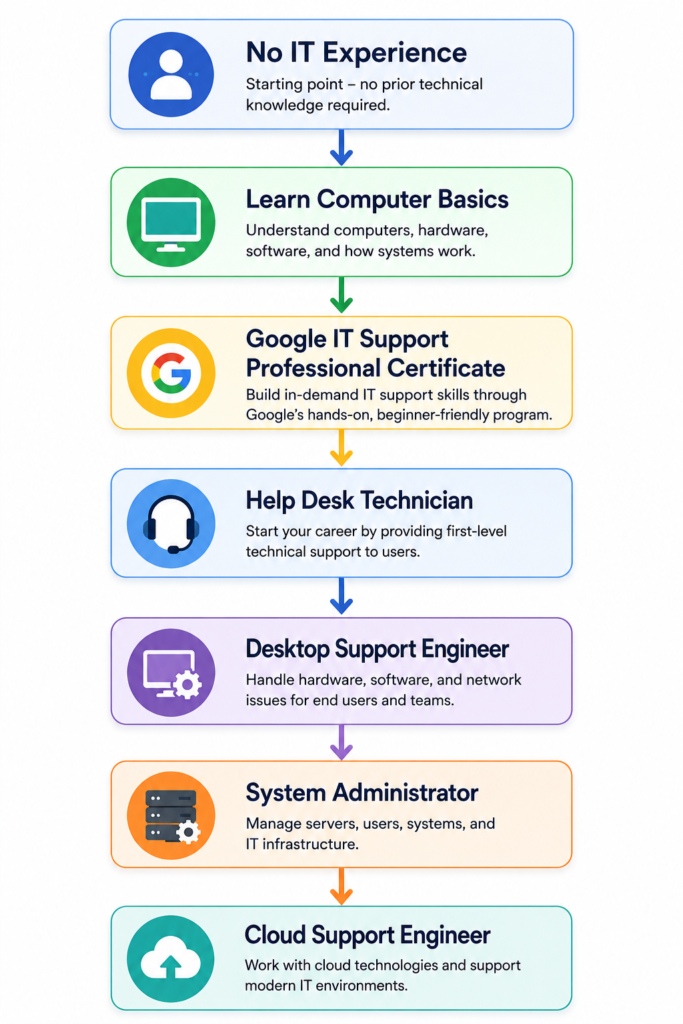
Skills Employers Look For
Beyond technical knowledge, employers often seek:
Technical Skills
- Windows Administration
- Linux Basics
- Computer Hardware
- Networking Fundamentals
- Troubleshooting
- Active Directory Basics
- Security Fundamentals
Soft Skills
- Customer Service
- Communication
- Problem Solving
- Documentation
- Time Management
- Teamwork
Advantages of the Google IT Support Professional Certificate
Pros
- Beginner friendly
- No degree required
- No prior IT experience needed
- Flexible self-paced learning
- Hands-on labs
- Industry-recognized by Google
- Affordable subscription model
- Strong foundation for further certifications
Disadvantages
Cons
- Not a proctored certification exam
- Recognition may vary by employer
- Less vendor-neutral than some certifications
- Practical experience is still essential
- Advanced IT topics are not covered in depth
Google IT Support vs CompTIA A+
One of the most common questions learners ask is which certification to pursue first.
| Feature | Google IT Support | CompTIA A+ |
|---|---|---|
| Provider | CompTIA | |
| Format | Online courses | Certification exams |
| Hands-on Labs | ✔ Yes | Limited (self-practice recommended) |
| Beginner Friendly | ⭐⭐⭐⭐⭐ | ⭐⭐⭐⭐☆ |
| Exam Required | No | Yes |
| Vendor Neutral | No | Yes |
| Industry Recognition | High | Very High |
| Best For | Learning IT fundamentals | Validating IT support skills |
Which Should You Choose?
Choose Google IT Support if you:
- Are completely new to IT
- Prefer structured online learning
- Want guided labs and projects
- Need a flexible study schedule
Choose CompTIA A+ if you:
- Already have basic IT knowledge
- Want a globally recognized certification
- Are applying for roles where employers explicitly request A+
For many learners, the best path is to complete the Google IT Support Professional Certificate first and then prepare for CompTIA A+.
8-Week Study Plan
| Week | Topics |
|---|---|
| Week 1 | Computer fundamentals and hardware |
| Week 2 | Operating systems |
| Week 3 | Networking basics |
| Week 4 | Linux fundamentals |
| Week 5 | System administration |
| Week 6 | IT security |
| Week 7 | Hands-on labs and revision |
| Week 8 | Final assessments and certificate completion |
Studying 8–10 hours per week is generally enough to finish the program in about two months.
Best Learning Resources
Official Resources
Supplementary Resources
- YouTube IT support tutorials
- Microsoft Learn
- Cisco Networking Academy (Networking Basics)
- Linux documentation
- VirtualBox for hands-on practice
Preparation Tips
- Set aside consistent study time each week.
- Complete every hands-on lab.
- Practice Linux commands regularly.
- Build a small home lab using VirtualBox.
- Learn basic networking concepts thoroughly.
- Keep notes of common troubleshooting steps.
- Practice explaining technical concepts in simple language.
- Update your LinkedIn profile after earning the certificate.
Common Mistakes to Avoid
- Skipping hands-on exercises
- Memorizing concepts without understanding them
- Ignoring Linux modules
- Rushing through assessments
- Not practicing troubleshooting scenarios
- Assuming the certificate alone guarantees a job
- Failing to build a resume and portfolio
Is the Google IT Support Professional Certificate Worth It in 2026?
It is worth it if:
- You are starting an IT career.
- You have no prior technical experience.
- You want a structured learning path.
- You prefer practical, self-paced training.
- You are planning to pursue advanced certifications later.
It may not be worth it if:
- You already have several years of IT support experience.
- You hold advanced infrastructure or cloud certifications.
- You are targeting senior engineering or architect roles.
Final Verdict
The Google IT Support Professional Certificate is one of the best entry-level IT learning programs available in 2026. It provides a practical, structured introduction to computer hardware, networking, operating systems, security, and troubleshooting without requiring prior experience.
Its biggest strengths are its beginner-friendly curriculum, hands-on labs, and flexible online format. While it may not replace certifications like CompTIA A+ for every employer, it is an excellent starting point for building foundational IT skills and launching a career in technical support.
If you’re new to IT or considering a career switch, this certificate offers a solid return on your investment and prepares you for further learning in cloud computing, cybersecurity, and system administration.
Related Articles
- Best IT Certifications for Beginners
- Google Data Analytics Professional Certificate Review
- AWS Certified Cloud Practitioner Certification Guide
- ServiceNow CSA Certification Guide
- CompTIA A+ Certification Guide
- Career Change to IT Without a Degree
- Best Entry-Level IT Certifications
Frequently Asked Questions (FAQs)
Is the Google IT Support Professional Certificate recognized by employers?
Yes. Many employers recognize Google Career Certificates as evidence of foundational IT knowledge, especially for entry-level roles.
Can I get a job after completing this certificate?
The certificate can help you qualify for entry-level IT support positions. Combining it with hands-on practice, a strong resume, and interview preparation will improve your chances.
Does the certificate expire?
No. The Google IT Support Professional Certificate does not have an expiration date.
Is coding required?
No. Programming knowledge is not required for this certificate.
Can beginners complete this program?
Yes. It is specifically designed for learners with little or no IT experience.
Is this better than CompTIA A+?
They serve different purposes. Google IT Support focuses on learning through guided coursework, while CompTIA A+ is an industry certification that validates your knowledge through exams.