
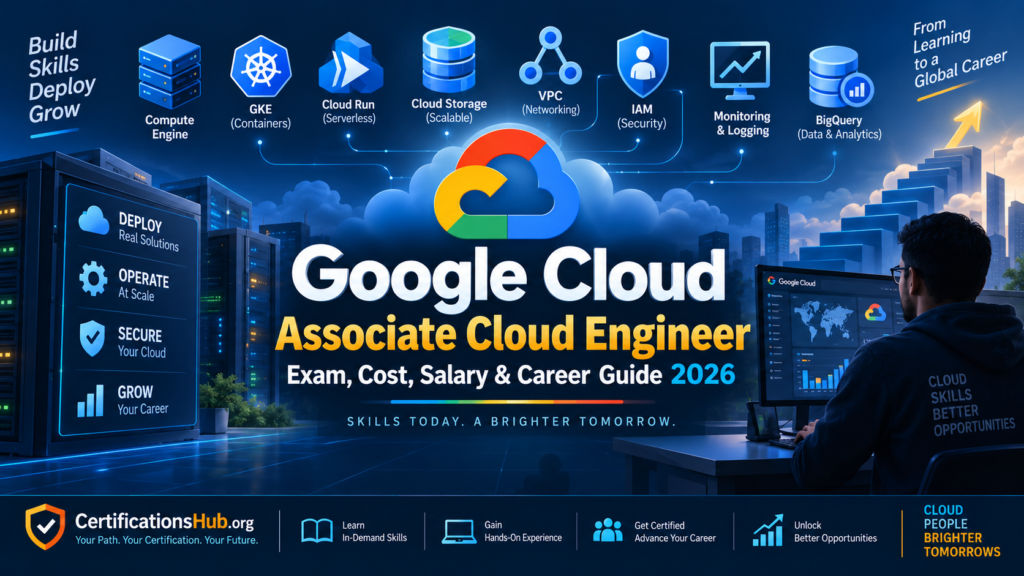
If you want to build a career as a cloud engineer using Google Cloud, the Google Cloud Associate Cloud Engineer certification is one of the most relevant certifications to consider.
Unlike entry-level cloud fundamentals certifications, Associate Cloud Engineer focuses much more on practical cloud administration and operations.
The certification validates skills related to setting up Google Cloud environments, deploying and implementing cloud solutions, operating deployed workloads, and configuring access and security. Google currently recommends 6+ months of hands-on experience with Google Cloud before attempting the exam.
The certification is particularly relevant for professionals interested in roles such as:
- Cloud Engineer
- Google Cloud Engineer
- Cloud Administrator
- Cloud Operations Engineer
- Infrastructure Engineer
- Cloud Support Engineer
- Junior DevOps Engineer
- Site Reliability Engineering-related roles
But there is an important distinction:
Passing the Associate Cloud Engineer exam does not automatically make you job-ready as a cloud engineer.
You also need practical experience with services such as Compute Engine, Google Kubernetes Engine, Cloud Storage, VPC networking, IAM, monitoring and other Google Cloud technologies.
This guide explains the Google Cloud Associate Cloud Engineer Certification in 2026, including the exam, cost, eligibility, syllabus, difficulty, preparation time, career value and salary.
Table of Contents
Google Cloud Associate Cloud Engineer Certification: Quick Overview
| Feature | Details |
|---|---|
| Certification | Google Cloud Associate Cloud Engineer |
| Cloud Platform | Google Cloud |
| Certification Level | Associate |
| Exam Duration | 2 hours |
| Questions | 50–60 |
| Question Types | Multiple choice and multiple select |
| Exam Fee | US$125 + applicable tax |
| Prerequisites | None |
| Recommended Experience | 6+ months hands-on Google Cloud experience |
| Exam Languages | English, Japanese, Spanish, Portuguese |
| Delivery | Online-proctored or testing center |
| Certification Validity | 3 years |
| Main Focus | Deployment, operations, infrastructure, access and security |
| Difficulty | Moderate to challenging for beginners |
| Best For | Aspiring Google Cloud engineers and cloud administrators |
These are the current standard-exam details published by Google Cloud.
What Is the Google Cloud Associate Cloud Engineer Certification?
The Google Cloud Associate Cloud Engineer (ACE) certification validates your ability to perform practical cloud engineering tasks on Google Cloud.
Google describes an Associate Cloud Engineer as someone who can deploy and secure applications, services and infrastructure, monitor operations across multiple projects, and maintain enterprise solutions to meet performance requirements.
The exam specifically assesses four broad capabilities:
- Setting up a cloud solution environment
- Planning and implementing a cloud solution
- Ensuring the successful operation of a cloud solution
- Configuring access and security
This makes ACE considerably more technical than a purely foundational cloud certification.
You are expected to understand not only what Google Cloud services are, but also how to deploy, configure, manage and troubleshoot them.
Who Should Take the Google Cloud Associate Cloud Engineer Certification?
The certification is particularly suitable for people who want to work directly with Google Cloud infrastructure and services.
It can be a good choice for:
- IT support professionals moving into cloud
- System administrators
- Network administrators
- Infrastructure engineers
- Cloud support professionals
- DevOps professionals
- Software developers working with Google Cloud
- IT professionals transitioning from AWS or Azure
- Fresh cloud engineers with some practical exposure
- Professionals working in Google Cloud environments
It can also be useful if your organization is migrating applications or infrastructure to Google Cloud.
Who Should Not Start With Associate Cloud Engineer?
ACE is not necessarily the best first certification for someone who has zero IT or cloud knowledge.
If you have never worked with:
- Operating systems
- Networking
- Servers
- Virtual machines
- Storage
- Databases
- Identity and access
- Basic cloud concepts
the Associate Cloud Engineer exam may feel significantly more difficult.
In that situation, you may want to first learn cloud fundamentals before moving into the Associate Cloud Engineer preparation.
Google itself recommends hands-on Google Cloud experience before attempting ACE.
Google Cloud Associate Cloud Engineer Eligibility
One of the advantages of the certification is that Google does not impose a formal prerequisite.
The current Google Cloud certification page states:
Prerequisites: None
However, Google recommends:
6+ months of hands-on experience with Google Cloud.
This distinction is important.
Formal eligibility
You do not need to:
- Hold another Google Cloud certification
- Have a college degree
- Work for a Google Cloud partner
- Complete a mandatory training course
- Pass Cloud Digital Leader first
Recommended preparation
Google recommends gaining practical experience with Google Cloud before taking the exam.
That means you should ideally have experience performing tasks such as:
- Creating projects
- Configuring IAM
- Deploying Compute Engine instances
- Working with Cloud Storage
- Creating VPC networks
- Managing firewall rules
- Deploying applications
- Working with GKE
- Monitoring resources
- Viewing logs
- Managing cloud costs
Do You Need IT Experience for Associate Cloud Engineer?
You don’t need formal IT work experience to register for the exam.
However, technical knowledge is highly useful.
A person with experience in system administration, networking or infrastructure may find ACE easier than someone who has only studied cloud theory.
Useful background knowledge includes:
Operating Systems
- Linux basics
- Windows Server concepts
- SSH
- Files and permissions
Networking
- IP addresses
- Subnets
- DNS
- Routing
- Firewalls
- Load balancing
Infrastructure
- Servers
- Virtual machines
- Storage
- Databases
Security
- Authentication
- Authorization
- IAM
- Least privilege
Cloud
- Regions
- Zones
- Scalability
- Availability
- Resource hierarchy
- Consumption-based pricing
You don’t need to be an expert in all of these before starting.
But having the fundamentals can significantly reduce the learning curve.
Google Cloud Associate Cloud Engineer Exam Overview
The current standard ACE exam has the following structure:
| Exam Feature | Details |
|---|---|
| Duration | 2 hours |
| Questions | 50–60 |
| Question Format | Multiple choice and multiple select |
| Registration Fee | US$125 + applicable tax |
| Languages | English, Japanese, Spanish, Portuguese |
| Delivery | Online-proctored or testing center |
| Prerequisites | None |
| Recommended Experience | 6+ months hands-on Google Cloud |
| Validity | 3 years |
Google confirms that the standard exam can be taken remotely with online proctoring or at a testing center.
Does Google Cloud Associate Cloud Engineer Have a Passing Score?
Google does not currently publish a simple percentage passing score such as 70% or 75% for the Associate Cloud Engineer exam.
This is different from certifications where a vendor publicly specifies a numeric passing score.
Therefore, you should be cautious about websites claiming that you need an exact percentage such as 70% to pass ACE unless they can substantiate that claim with current official Google Cloud documentation.
For preparation purposes, focus on being consistently strong across the exam objectives rather than targeting a specific unofficial percentage.
Is the Associate Cloud Engineer Exam Open Book?
No.
The certification is a proctored examination.
You can take it:
- Online from a remote location with online proctoring
- At an authorized testing center
Google lists both delivery methods on the official certification page.
Google Cloud Associate Cloud Engineer Exam Domains
The current official exam guide organizes the ACE exam into four major sections:
| Domain | Approximate Exam Weight |
|---|---|
| Setting up a cloud solution environment | ~20% |
| Planning and implementing a cloud solution | ~30% |
| Ensuring successful operation of a cloud solution | ~30% |
| Configuring access and security | ~20% |
The most heavily weighted areas are therefore:
Planning and implementing solutions
and
Operating cloud solutions successfully.
Together, these account for approximately 60% of the exam.
Domain 1: Setting Up a Cloud Solution Environment
This domain represents approximately 20% of the exam.
It focuses on setting up Google Cloud projects, accounts, billing and the overall cloud environment.
Key topics include:
Google Cloud Resource Hierarchy
Understand:
- Organizations
- Folders
- Projects
- Resources
You should know how resources are organized and how policies and permissions can be inherited.
IAM Roles
Understand:
- Identity and Access Management
- Roles
- Permissions
- Policy inheritance
- Granting access
Cloud Identity
You should understand how users and groups can be managed within Google Cloud environments.
APIs
You may need to understand how APIs are enabled within Google Cloud projects.
Quotas
Learn:
- What quotas are
- Why quotas exist
- How to check quotas
- When quota increases may be required
Networking Setup
You should understand the basic process of establishing cloud networking.
Regions and Zones
Understand:
- Google Cloud regions
- Zones
- Geographic availability
- Resource location
Billing
The domain also covers:
- Billing accounts
- Linking projects to billing accounts
- Budgets
- Alerts
- Billing exports
The current exam guide specifically includes these areas under setting up a cloud solution environment.
Domain 2: Planning and Implementing a Cloud Solution
This is one of the most important sections of the exam and represents approximately 30%.
It covers the actual deployment and implementation of Google Cloud resources.
Compute
You should understand when to use services such as:
- Compute Engine
- Google Kubernetes Engine
- Cloud Run
- Cloud Run functions
- Other supported compute environments
The exam guide also covers selecting appropriate compute options based on workload requirements.
Compute Engine
Understand:
- Virtual machine instances
- Machine types
- Instance templates
- Managed instance groups
- Autoscaling
- Persistent disks
- Availability policies
- SSH access
Google Kubernetes Engine
Understand:
- GKE clusters
- Autopilot
- Regional clusters
- Private clusters
- Nodes
- Pods
- Services
- Node pools
Cloud Run
Understand:
- Serverless container deployment
- Application deployment
- Autoscaling
- Traffic management
Storage and Data Solutions
The current ACE exam guide includes a wide range of storage and data services.
Important services include:
- Cloud Storage
- Filestore
- Cloud SQL
- BigQuery
- Firestore
- Spanner
- Bigtable
- AlloyDB
- Pub/Sub
- Dataflow
- Memorystore
You should focus less on memorizing product descriptions and more on understanding:
Which service should you choose for a particular requirement?
For example:
| Requirement | Service You Should Understand |
|---|---|
| Object storage | Cloud Storage |
| Relational database | Cloud SQL |
| Analytics/data warehouse | BigQuery |
| NoSQL document database | Firestore |
| Globally scalable relational database | Spanner |
| Large-scale NoSQL workloads | Bigtable |
| Messaging | Pub/Sub |
| Data processing | Dataflow |
The official exam guide currently lists these services among the areas candidates should understand.
Networking
Networking is another major part of the Associate Cloud Engineer exam.
You should understand:
- VPC networks
- Subnets
- Shared VPC
- VPC Network Peering
- Firewall rules
- Cloud Next Generation Firewall
- Cloud VPN
- Cloud Interconnect
- Load balancing
- Network Service Tiers
You should also understand ingress and egress concepts and how firewall rules affect traffic.
Example
If a company needs private connectivity between its on-premises environment and Google Cloud, you should understand which connectivity options may be appropriate.
The exam is therefore not simply testing:
“What is Cloud VPN?”
It can test:
“Which connectivity approach best fits this requirement?”
That is why hands-on experience matters.
Infrastructure as Code and Cloud Tooling
The current exam guide also includes Infrastructure as Code and deployment tooling.
You should be familiar with concepts such as:
- Terraform
- Config Connector
- Helm
- Infrastructure as Code
- Google Cloud CLI
- Kubernetes CLI
The current guide also includes AI-assisted planning and implementation tools such as Gemini CLI and Gemini Cloud Assist.
Domain 3: Ensuring Successful Operation of a Cloud Solution
This domain represents approximately 30% of the exam.
It focuses on what happens after your cloud resources have been deployed.
This is an important difference between simply knowing cloud services and understanding cloud operations.
Managing Compute Resources
You should understand how to:
- Connect to Compute Engine instances
- View running instances
- Work with images
- Create snapshots
- Manage GKE clusters
- Manage node pools
- Work with Kubernetes resources
- Configure autoscaling
- Deploy new application versions
- Manage Cloud Run traffic
- Configure application autoscaling
The current exam guide includes both VM-based and container/serverless operations.
Managing Storage and Data
You should understand how to:
- Manage Cloud Storage objects
- Configure lifecycle policies
- Query databases
- Estimate storage costs
- Back up databases
- Restore databases
- Review data-processing jobs
- Configure encryption
You should also understand the operational differences between the various Google Cloud data services.
Managing Networking Resources
This includes tasks such as:
- Resizing subnet IP ranges
- Reserving IP addresses
- Configuring routes
- Using Cloud DNS
- Using Cloud NAT
- Managing firewall rules
- Managing network security policies
Monitoring and Logging
Monitoring is an important component of cloud engineering.
You should understand:
- Cloud Monitoring
- Cloud Logging
- Metrics
- Alerts
- Audit logs
- VPC Flow Logs
- Log routing
- Log buckets
- Log Analytics
- Cloud Trace
- Cloud Profiler
- Application troubleshooting
The current exam guide also includes tools such as Ops Agent, Managed Service for Prometheus, Active Assist and Cloud Hub.
Domain 4: Configuring Access and Security
This domain represents approximately 20% of the exam.
Security is not a separate concern that you learn only after deployment.
It is built into almost every cloud engineering task.
IAM
Understand:
- IAM policies
- Roles
- Permissions
- Role inheritance
- Predefined roles
- Custom roles
- Least privilege
Service Accounts
Understand:
- Creating service accounts
- Assigning service accounts
- IAM permissions
- Service account impersonation
- Short-lived credentials
- Using service accounts with GKE
- Workload Identity Federation
Associate Cloud Engineer Topic Summary
| Area | What You Should Understand |
|---|---|
| Cloud environment | Projects, organizations, folders, billing |
| IAM | Roles, permissions, policies |
| Compute | Compute Engine, GKE, Cloud Run |
| Storage | Cloud Storage, Filestore |
| Databases | Cloud SQL, BigQuery, Firestore, Spanner, Bigtable |
| Networking | VPC, subnets, firewall, VPN, Interconnect |
| Containers | GKE, Pods, Services, node pools |
| Serverless | Cloud Run and related services |
| Monitoring | Cloud Monitoring, Logging, alerts |
| Security | IAM, service accounts, Workload Identity |
| Operations | Backups, snapshots, autoscaling, troubleshooting |
| Automation | Terraform, CLI, configuration tools |
| Billing | Budgets, alerts, billing accounts |
Google Cloud Associate Cloud Engineer vs Cloud Digital Leader
These certifications are often confused because both are Google Cloud certifications.
However, they target very different levels.
| Feature | Cloud Digital Leader | Associate Cloud Engineer |
|---|---|---|
| Level | Foundational | Associate |
| Primary focus | Cloud concepts and business understanding | Technical cloud engineering |
| Coding required | No | Not necessarily, but technical skills matter |
| Hands-on focus | Low | High |
| Target audience | Business/technical professionals | Cloud/IT professionals |
| Recommended experience | General cloud understanding | 6+ months hands-on Google Cloud |
| Exam duration | 90 minutes | 2 hours |
| Career direction | Cloud-aware professional | Cloud Engineer / Cloud Operations |
Google categorizes Cloud Digital Leader as foundational and Associate Cloud Engineer as an associate-level certification validating skills to deploy and maintain cloud projects.
Which should a beginner choose?
If you are completely new to cloud:
Cloud Digital Leader → Cloud fundamentals → Associate Cloud Engineer
can be a sensible learning path.
If you already have IT infrastructure or cloud experience, you may be able to prepare directly for ACE.
Google Cloud Associate Cloud Engineer vs AWS Solutions Architect Associate
Another useful comparison is with AWS Solutions Architect Associate.
| Feature | Google Cloud Associate Cloud Engineer | AWS Solutions Architect Associate |
|---|---|---|
| Platform | Google Cloud | AWS |
| Level | Associate | Associate |
| Main focus | Deployment and operations | Architecture and solution design |
| Hands-on orientation | High | High |
| Infrastructure | Strong | Strong |
| Networking | Strong | Strong |
| Security | Strong | Strong |
| Operations | Strong | Moderate/strong |
| Architecture | Moderate | Strong |
| Best for | Cloud engineering/operations | AWS architecture |
| Recommended starting point | Google Cloud experience | AWS/cloud fundamentals |
If your target role is Google Cloud engineering, ACE is the more directly aligned certification.
If your target role is AWS architecture, AWS Solutions Architect Associate may be more appropriate.
Is Google Cloud Associate Cloud Engineer Difficult?
I would rate the exam approximately 7/10 for a beginner.
For someone with six months or more of hands-on Google Cloud experience, the difficulty may feel closer to 6/10.
For someone who has only memorized cloud concepts without using Google Cloud, it can feel significantly harder.
Why is ACE challenging?
Because the exam is not purely theoretical.
You need to understand:
- Which service to choose
- How services interact
- How to deploy resources
- How to configure access
- How to troubleshoot
- How networking works
- How applications operate
- How monitoring works
The official exam guide itself contains practical tasks such as deploying GKE clusters, configuring networking, managing Compute Engine instances, managing Cloud Storage, querying databases and configuring IAM.
What Makes ACE Different From a Beginner Cloud Certification?
Consider the difference between these questions:
Beginner-level question
What is a virtual machine?
versus:
Associate-level question
Which Compute Engine configuration would be appropriate for a particular workload requirement?
The second question requires you to understand trade-offs and implementation choices.
That’s why hands-on labs are so important.
Google Cloud Associate Cloud Engineer Exam Cost in 2026
The current standard exam registration fee is:
US$125 + applicable tax
Google Cloud publishes the fee in USD rather than a fixed INR price on its certification page.
What does this mean for candidates in India?
Your final amount in INR can vary depending on:
- Exchange rate
- Applicable taxes
- Registration/payment processing
Therefore, avoid presenting a permanent INR amount in the article as if it were an official fixed fee.
For CertificationsHub.org, the safest wording is:
Google Cloud Associate Cloud Engineer exam fee: US$125 plus applicable tax. The final INR amount depends on the exchange rate and applicable taxes at the time of registration.
Other Costs You Should Consider
The exam fee is only one component of your certification budget.
You may also spend money on:
- Training
- Practice tests
- Hands-on labs
- Books
- Cloud usage
- Mock exams
- Retakes
However, you don’t necessarily need an expensive training program.
Google Cloud provides official learning resources and hands-on learning options. The Associate Cloud Engineer certification page also notes that Google Cloud offers free usage of more than 20 products within monthly limits and that new Google Cloud customers can receive $300 in free credits, subject to the applicable terms.
How Much Does It Cost to Prepare for ACE?
Your preparation cost can vary considerably.
Option 1: Self-study
Potential cost:
Low
You can use:
- Google Cloud documentation
- Official exam guide
- Google Cloud learning resources
- Hands-on labs
- Practice questions
Option 2: Structured online preparation
Potential cost:
Moderate
You may purchase:
- Online courses
- Practice exams
- Lab subscriptions
Option 3: Instructor-led training
Potential cost:
Higher
This may include:
- Live classes
- Instructor support
- Hands-on labs
- Practice exams
- Projects
For most candidates, the key consideration should not be:
“What is the most expensive course?”
Instead ask:
“Which preparation approach gives me enough hands-on experience to actually perform the tasks covered by the exam?”
How Long Does It Take to Prepare for Associate Cloud Engineer?
Your preparation time depends heavily on your existing experience.
| Background | Suggested Preparation |
|---|---|
| Complete cloud beginner | 10–14 weeks |
| IT professional with infrastructure experience | 8–10 weeks |
| AWS/Azure cloud professional switching to GCP | 6–8 weeks |
| Existing Google Cloud user | 4–6 weeks |
| Strong hands-on GCP professional | 3–5 weeks |
These are practical preparation estimates, not official Google timelines.
The most important factor is not the number of weeks.
It is the amount of hands-on Google Cloud practice you complete during those weeks.
Recommended Daily Study Time
If you have a full-time job
Aim for:
1–1.5 hours on weekdays
plus
2–3 hours on weekends
If you are studying full-time
Aim for:
3–5 hours per day
with a substantial portion dedicated to labs.
A good preparation ratio is:
40% theory + 40% hands-on practice + 20% practice questions/revision
This is more effective for ACE than spending almost all your preparation time watching videos.
How to Prepare for Google Cloud Associate Cloud Engineer
A practical preparation strategy should follow the actual exam domains.
Step 1: Learn Cloud Fundamentals
Before jumping into ACE-specific services, understand:
- Cloud computing
- IaaS
- PaaS
- SaaS
- Regions
- Zones
- Virtual machines
- Containers
- Serverless
- Storage
- Databases
- Networking
- IAM
Step 2: Learn the Google Cloud Console
Spend time navigating the Google Cloud environment.
Learn how to:
- Create a project
- Enable APIs
- Create resources
- View resources
- Configure IAM
- Monitor usage
- View billing information
Don’t simply watch someone else perform these tasks.
Perform them yourself.
Step 3: Learn the Google Cloud CLI
Become comfortable with the command line.
Understand the purpose of:
gcloud
and, where relevant:
kubectl
You don’t necessarily need to memorize every command.
Instead, understand the common workflows and what the commands accomplish.
Step 4: Build Compute Skills
Practice:
- Creating Compute Engine VMs
- Connecting to VMs
- Configuring machine types
- Working with disks
- Creating snapshots
- Creating images
- Creating instance templates
- Understanding managed instance groups
- Configuring autoscaling
Step 5: Practice GKE
Learn the fundamentals of:
- Clusters
- Nodes
- Pods
- Services
- Node pools
- Autopilot
- Regional clusters
- Private clusters
- Application deployment
GKE is an important component of the current ACE exam guide.
Step 6: Practice Storage and Databases
Build small exercises around:
- Cloud Storage
- Cloud SQL
- BigQuery
- Firestore
Focus on understanding when to choose each service.
Step 7: Build Networking Skills
Practice:
- VPC creation
- Subnets
- Firewall rules
- Routes
- Cloud NAT
- Cloud DNS
- VPC Peering
- VPN
- Load balancing
Networking is one of the areas where hands-on practice can make a major difference.
Step 8: Learn IAM and Security
Practice:
- Creating users
- Creating roles
- Assigning roles
- Understanding inheritance
- Creating service accounts
- Assigning service accounts
- Understanding least privilege
- Workload Identity
Step 9: Learn Monitoring and Logging
Practice:
- Cloud Monitoring
- Cloud Logging
- Alerts
- Metrics
- Audit logs
- VPC Flow Logs
- Log routing
- Troubleshooting
Step 10: Practice Questions
Once you’ve covered the domains, start working through practice questions.
Don’t just record your score.
For every incorrect answer ask:
Why was my answer wrong?
and:
Why is the correct option better?
This approach is much more valuable than simply repeating mock exams.
Google Cloud’s Recommended Preparation Approach
Google itself recommends a preparation process that starts with real-world experience, followed by reviewing the exam guide, completing training, reviewing sample questions and then scheduling the exam.
Google’s Cloud Engineer learning path includes courses, hands-on labs and other preparation resources.
The official certification page also recommends completing the “Preparing for the Associate Cloud Engineer Examination” course before taking the standard exam.
Best Study Strategy for ACE
Don’t prepare for ACE like a theory exam.
Use this cycle:
Learn → Build → Break → Fix → Practice Questions → Revise
For example:
Learn
Understand VPC networking.
↓
Build
Create a VPC and subnet.
↓
Break
Change a firewall rule.
↓
Fix
Troubleshoot the connectivity issue.
↓
Practice
Answer networking questions.
↓
Revise
Review the concepts you got wrong.
This approach develops the practical judgment the certification is designed to assess.
What You Should Be Able to Do Before Taking the Exam
Before booking your exam, you should ideally be comfortable with tasks such as:
Compute
- Create and manage VMs
- Understand machine types
- Work with disks
- Create snapshots
- Understand autoscaling
Networking
- Create VPCs
- Create subnets
- Configure firewall rules
- Understand routes
- Understand VPN and Interconnect
- Understand load balancing
Storage
- Create Cloud Storage buckets
- Manage objects
- Configure lifecycle rules
- Understand storage classes
Databases
- Understand Cloud SQL
- Understand BigQuery
- Understand Firestore
- Understand Spanner and Bigtable at a conceptual level
Containers
- Understand GKE
- Deploy applications
- Understand Pods and Services
- Understand node pools
Security
- Configure IAM
- Understand roles
- Manage service accounts
- Apply least privilege
Operations
- Monitor resources
- Review logs
- Create alerts
- Troubleshoot problems
If these activities are still completely unfamiliar, spend more time in the lab before scheduling the exam.
Google Cloud Associate Cloud Engineer Salary in India
One of the biggest reasons professionals consider the Google Cloud Associate Cloud Engineer certification is the potential to move into higher-value cloud infrastructure and engineering roles.
However, there is an important distinction:
The Associate Cloud Engineer certification does not guarantee a specific salary.
Your compensation will depend on:
- Years of experience
- Cloud platform skills
- Hands-on experience
- Linux knowledge
- Networking skills
- DevOps knowledge
- Kubernetes experience
- Infrastructure as Code
- Employer
- Location
- Job role
- Interview performance
Current salary data also varies considerably between sources. Indeed’s India Cloud Engineer salary page reported an average base salary of about ₹10.68 lakh per year, based on 126 reported salaries and updated in August 2026. Its reported range was approximately ₹5.70 lakh to ₹20.04 lakh per year.
Glassdoor’s July 2026 India data reported an average of approximately ₹6.95 lakh per year, with a typical range of around ₹4.40 lakh to ₹11.50 lakh and reported top-end salaries reaching about ₹18.35 lakh.
These differences demonstrate why CertificationsHub.org should treat salary numbers as market estimates rather than guaranteed certification outcomes.
Approximate career-stage salary ranges
| Experience / Profile | Indicative India Salary |
|---|---|
| Entry-level / junior cloud role | ₹4–7 LPA |
| 1–3 years | ₹6–12 LPA |
| 3–5 years | ₹10–18 LPA |
| 5–8 years | ₹15–25+ LPA |
| Senior / specialist cloud roles | ₹20–35+ LPA |
These are indicative ranges, not official Google Cloud salary figures. Actual compensation can be significantly higher or lower depending on skills, company, location and role.
Does the Google Cloud Certification Increase Your Salary?
Potentially, but indirectly.
A certification can help you:
- Demonstrate structured knowledge
- Get past some recruiter screening
- Strengthen your resume
- Validate Google Cloud skills
- Support an internal career transition
- Give you a structured learning roadmap
But the certification itself isn’t the salary driver.
Consider two candidates:
Candidate A
ACE certification
but:
- No projects
- Limited Linux
- Limited networking
- No Terraform
- No Kubernetes experience
Candidate B
ACE certification
plus:
- Linux
- Networking
- Terraform
- GCP projects
- GKE
- CI/CD
- Monitoring
- Troubleshooting
Candidate B is generally in a much stronger position for a cloud engineering role.
The certification validates the learning.
Hands-on skills demonstrate that you can apply it.
What Jobs Can You Get After Associate Cloud Engineer?
The certification aligns most closely with cloud infrastructure and operations roles.
Potential career directions include:
- Cloud Engineer
- Google Cloud Engineer
- Cloud Administrator
- Cloud Operations Engineer
- Infrastructure Engineer
- Cloud Support Engineer
- DevOps Engineer
- Platform Engineer
- Site Reliability Engineer
- Cloud Consultant
- Cloud Solutions Engineer
Not every role listed above is an entry-level position.
For example, SRE, Platform Engineer and senior DevOps roles typically require considerably more experience beyond ACE.
Google describes the Associate Cloud Engineer role itself around deploying and securing applications, services and infrastructure, monitoring multiple projects and maintaining enterprise solutions.
Google Cloud Associate Cloud Engineer Career Path
A practical career path can look like this:
IT Fundamentals
↓
Cloud Fundamentals
↓
Google Cloud Hands-On Skills
↓
Associate Cloud Engineer
↓
Junior Cloud / Cloud Operations Role
↓
Cloud Engineer
↓
Senior Cloud Engineer
↓
Cloud Architect / Platform Engineer / SRE / Cloud Security
The certification is therefore best viewed as a career accelerator and skills validation, not the destination.
Career Path for Beginners
If you are completely new to IT, consider the following progression.
Stage 1 – IT Fundamentals
Learn:
- Operating systems
- Networking
- Linux
- Servers
- Storage
- Databases
- Basic security
Stage 2 – Cloud Fundamentals
Learn:
- Cloud computing
- IaaS
- PaaS
- SaaS
- Regions
- Zones
- Virtual machines
- Containers
- Serverless
Stage 3 – Google Cloud
Learn:
- Compute Engine
- Cloud Storage
- VPC
- IAM
- Cloud SQL
- BigQuery
- GKE
- Cloud Run
Stage 4 – Associate Cloud Engineer
Prepare for the certification.
Stage 5 – Practical Experience
Build:
- Cloud projects
- Labs
- Terraform configurations
- GKE deployments
- Monitoring setups
Stage 6 – First Cloud Role
Target:
- Cloud Support
- Junior Cloud Engineer
- Cloud Operations
- Infrastructure Support
- Junior DevOps
Career Path for Existing IT Professionals
If you’re already working in IT, you don’t necessarily need to start from zero.
For example:
System Administrator
↓
Google Cloud Fundamentals
↓
ACE
↓
Cloud Administrator / Cloud Engineer
↓
DevOps / Platform / Cloud Architecture
Similarly:
Network Engineer
↓
GCP Networking
↓
ACE
↓
Cloud Network Engineer
↓
Cloud Architect / Network Specialist
Or:
Developer
↓
Google Cloud Application Deployment
↓
ACE
↓
Cloud Developer / DevOps
The best path depends on your existing role.
Google Cloud Associate Cloud Engineer vs AWS and Azure Certifications
If you are choosing your first technical cloud certification, you may be deciding between:
- Google Cloud Associate Cloud Engineer
- AWS Solutions Architect Associate
- Microsoft Azure Administrator Associate
These are not identical certifications.
| Certification | Main Focus | Best Suited For |
|---|---|---|
| Google Cloud Associate Cloud Engineer | Deployment and operations | GCP Cloud Engineer |
| AWS Solutions Architect Associate | Architecture and AWS solutions | AWS Architect / Cloud Engineer |
| Azure Administrator Associate | Azure administration | Azure Administrator / Cloud Engineer |
The choice should be driven primarily by:
Which cloud platform do your target employers use?
If your target companies heavily use Google Cloud, ACE can be an excellent choice.
If most of your target jobs require AWS, AWS may provide greater immediate relevance.
If Microsoft Azure dominates your target market, Azure certifications may make more sense.
Google Cloud Associate Cloud Engineer vs Cloud Digital Leader
If you are a complete beginner, this is another important decision.
Cloud Digital Leader
Best for:
- Project managers
- Business professionals
- Product professionals
- Sales professionals
- Non-technical professionals
- Beginners learning cloud concepts
Associate Cloud Engineer
Best for:
- IT professionals
- System administrators
- Infrastructure professionals
- Cloud engineers
- DevOps professionals
- Technical career switchers
Google categorizes Cloud Digital Leader as a foundational certification and Associate Cloud Engineer as an associate certification that validates fundamental skills to deploy and maintain cloud projects.
Simple rule
If your goal is:
Understand Google Cloud
→ Cloud Digital Leader
If your goal is:
Work with Google Cloud
→ Associate Cloud Engineer
Is Associate Cloud Engineer Worth It in 2026?
Yes, but primarily for the right candidate.
ACE is worth considering if you want to build a technical career around Google Cloud.
It is particularly valuable if you:
- Already work in IT
- Have infrastructure experience
- Work with Google Cloud
- Want to move into cloud engineering
- Want to move from on-premises infrastructure to cloud
- Want to build GCP administration skills
- Want a structured path into cloud operations
Google itself describes ACE as an associate certification for candidates with experience deploying cloud applications, monitoring operations and managing cloud enterprise solutions.
When ACE May Not Be Worth It
ACE may not be the best choice if:
You have no interest in Google Cloud
If your target employers are overwhelmingly AWS-based, spending months specializing in GCP may not be the most efficient strategy.
You want a non-technical cloud career
If you are a project manager, sales professional or business professional looking only for cloud awareness, Cloud Digital Leader may be more appropriate.
You have no basic IT knowledge
Jumping directly into ACE without understanding networking, operating systems and infrastructure can make preparation unnecessarily difficult.
You only want a certificate
If your strategy is:
“I’ll pass ACE and immediately get a high-paying cloud job.”
you are likely to be disappointed.
The certification should be combined with practical skills.
The Best ACE Career Strategy in 2026
For someone serious about becoming a cloud engineer, I recommend:
ACE + Linux + Networking + GCP Labs + Terraform + Git + CI/CD + Projects
This combination is significantly stronger than:
ACE + another certification + another certification
without practical experience.
Skills to Learn Alongside ACE
Linux
Learn:
- Filesystem
- Permissions
- Processes
- SSH
- Networking commands
- Package management
- Shell basics
Networking
Learn:
- TCP/IP
- DNS
- Subnets
- Routing
- Firewalls
- NAT
- Load balancing
- VPN
Git
Understand:
- Repositories
- Branches
- Commits
- Pull requests
- Merge workflows
Terraform
Infrastructure as Code is highly valuable for cloud engineering.
Learn how to:
- Create resources
- Manage infrastructure
- Use variables
- Use modules
- Manage state
- Plan changes
- Apply changes
Google’s own ACE preparation resources include Terraform-related skills badges.
Containers
Learn:
- Docker
- Container images
- Registries
- Kubernetes basics
- Pods
- Services
- Deployments
CI/CD
Understand:
- Build
- Test
- Deploy
- Automation
- Release pipelines
Monitoring
Learn:
- Metrics
- Logs
- Alerts
- Dashboards
- Troubleshooting
These skills turn certification knowledge into practical cloud engineering capability.
30-Day Google Cloud Associate Cloud Engineer Study Plan
A 30-day plan is possible if you already have a reasonable IT/cloud foundation.
If you are completely new, use the 60- or 90-day plan instead.
Days 1–5: Google Cloud Fundamentals
Study:
- Google Cloud architecture
- Projects
- Organizations
- Folders
- Regions
- Zones
- Billing
- IAM
- APIs
- Quotas
Days 6–10: Compute
Focus on:
- Compute Engine
- Machine types
- Persistent disks
- Images
- Snapshots
- Instance templates
- Managed instance groups
- Autoscaling
- Cloud Run
Build at least one VM-based project.
Days 11–15: Storage, Databases and Data
Study:
- Cloud Storage
- Cloud SQL
- BigQuery
- Firestore
- Spanner
- Bigtable
Create a storage bucket and work with permissions and lifecycle management.
Days 16–20: Networking and Security
Focus heavily on:
- VPC
- Subnets
- Routes
- Firewall rules
- Cloud NAT
- Cloud DNS
- VPN
- Load balancing
- IAM
- Service accounts
Build a simple network environment.
Days 21–24: GKE and Operations
Study:
- GKE
- Pods
- Services
- Node pools
- Autopilot
- Monitoring
- Logging
- Alerts
- Troubleshooting
Days 25–27: Practice Questions
Take practice tests.
For every wrong answer:
- Identify the concept.
- Read the documentation.
- Perform the task in Google Cloud.
- Retake similar questions.
Days 28–30: Final Revision
Review:
- IAM
- Networking
- Compute
- Storage
- GKE
- Monitoring
- Billing
- Troubleshooting
- Service selection
Don’t try to learn large new topics on the final day.
60-Day Preparation Plan
If you have a full-time job, a 60-day plan may be more realistic.
Weeks 1–2
Cloud fundamentals + Google Cloud Console
Weeks 3–4
Compute + storage + databases
Weeks 5–6
Networking + IAM + security
Week 7
GKE + Cloud Run + monitoring
Week 8
Terraform + CLI + automation
Final 4 days
Practice exams + weak-area revision
90-Day Preparation Plan
For a complete beginner, 90 days is a more comfortable approach.
Month 1 – Foundations
Learn:
- IT fundamentals
- Linux
- Networking
- Cloud concepts
- Google Cloud basics
Month 2 – Google Cloud Engineering
Build skills in:
- Compute Engine
- Cloud Storage
- VPC
- IAM
- Cloud SQL
- BigQuery
- GKE
- Cloud Run
- Monitoring
Month 3 – Certification + Projects
Focus on:
- ACE exam domains
- Practice questions
- Troubleshooting
- Terraform
- Projects
- Mock exams
- Weak-area revision
Hands-On Projects for Associate Cloud Engineer
Projects are one of the best ways to convert certification knowledge into resume value.
Project 1: Host a Website on Google Cloud
Use:
- Cloud Storage
- Cloud CDN where appropriate
- Cloud DNS
- IAM
Learn how storage, networking and access work together.
Project 2: Deploy an Application on Compute Engine
Build:
Internet → Load Balancer → Compute Engine → Database
Learn:
- VPC
- Firewall
- VM
- Load balancing
- IAM
- Monitoring
This is an excellent portfolio project.
Project 3: Deploy a Containerized Application on GKE
Build:
Docker → Container Registry/Artifact Registry → GKE → Service
Practice:
- Container deployment
- Kubernetes
- Networking
- Scaling
- Monitoring
Project 4: Build a Serverless Application
Use:
- Cloud Run
- Cloud Storage
- Cloud SQL or another appropriate data service
Learn:
- Serverless deployment
- Application scaling
- IAM
- Logging
- Monitoring
Project 5: Infrastructure as Code With Terraform
Create:
- VPC
- Subnet
- Firewall
- Compute Engine
- IAM configuration
using Terraform.
This project can demonstrate a more professional cloud engineering workflow than a simple certification badge.
Common Mistakes When Preparing for ACE
Mistake 1: Studying only videos
Watching cloud courses is not the same as operating cloud infrastructure.
Mistake 2: Memorizing services
Don’t memorize 50 services without understanding when to use them.
Mistake 3: Ignoring networking
Cloud engineering is heavily dependent on networking.
Mistake 4: Ignoring IAM
Many cloud problems eventually come down to permissions.
Mistake 5: Avoiding the command line
Become comfortable with Google Cloud CLI.
Mistake 6: Skipping troubleshooting
Learn to ask:
What changed?
What permission is missing?
Is the network reachable?
Is the resource running?
Are logs showing an error?
Mistake 7: Taking mock tests too early
Practice questions are most useful after you have built a reasonable conceptual foundation.
Mistake 8: Treating ACE as a job guarantee
Certification ≠ experience.
A better equation is:
Certification + Hands-On Skills + Projects + IT Experience = Stronger Career Profile
Google Cloud Associate Cloud Engineer Exam-Day Tips
Before the exam
Review:
- IAM
- VPC
- Compute Engine
- GKE
- Cloud Storage
- Databases
- Monitoring
- Billing
- Service selection
During the exam
Read the question carefully.
Look for keywords such as:
- Lowest cost
- Highly available
- Private
- Managed
- Serverless
- Scalable
- Minimal administration
- Existing infrastructure
- Security
- Performance
These clues can help you identify the most appropriate service.
Don’t rush
The exam provides 2 hours for 50–60 questions, giving you enough time to think through scenario-based questions.
What Happens If You Fail the ACE Exam?
Google’s current certification terms state that Associate and Professional certification exams allow a maximum of four attempts within two years.
The current waiting periods are:
- After the first failed attempt: 14 days
- After the second failed attempt: 60 days
- After the third failed attempt: 365 days
You must pay the exam fee for each attempt.
Therefore, don’t treat the first attempt as a practice exam.
Prepare seriously before scheduling.
How Long Is Associate Cloud Engineer Certification Valid?
The Associate Cloud Engineer certification is currently valid for three years.
Google has also introduced additional renewal options.
For active ACE holders within the renewal eligibility period, Google currently offers a shorter renewal exam priced at $75 plus applicable tax, consisting of 20 multiple-choice/multiple-select questions and lasting one hour.
Google has also introduced a Google Skills-based recertification pathway for eligible certifications, including Associate Cloud Engineer, using designated courses and skill badges.
This is useful because cloud technology changes quickly.
Is Google Cloud Associate Cloud Engineer Good for Career Switching?
Yes, but it should be part of a broader career-switch strategy.
Suppose you currently work in:
IT Support
You could move toward:
IT Support → Cloud Support → Cloud Engineer
System Administration
System Administrator → GCP Administrator → Cloud Engineer
Networking
Network Engineer → Cloud Network Engineer → Cloud Architect
Software Development
Developer → Cloud Developer → DevOps / Platform Engineer
DevOps
DevOps → GCP DevOps → Platform Engineer / SRE
The certification provides a structured way to learn Google Cloud, but your previous experience remains valuable.
Can a Fresher Get a Cloud Engineer Job With ACE?
It is possible, but it is important to set realistic expectations.
A fresher with:
ACE + projects + Linux + networking + Git + basic Terraform
will generally have a stronger profile than someone with:
ACE alone
For freshers, consider targeting adjacent entry-level positions such as:
- Cloud Support
- Technical Support
- Infrastructure Support
- Junior Cloud Operations
- Junior DevOps
- IT Operations
Then build toward a dedicated Cloud Engineer position.
Is Google Cloud Associate Cloud Engineer Better Than AWS or Azure?
There is no universal winner.
The better certification is the one aligned with your target cloud ecosystem.
Choose Google Cloud ACE if:
- Your target companies use GCP.
- You want Google Cloud engineering roles.
- You are interested in GKE and Google Cloud infrastructure.
- Your current organization is adopting Google Cloud.
- You want to build a GCP-focused technical career.
Choose AWS if:
- Your target companies primarily use AWS.
- You want AWS architecture or engineering roles.
- You already work with AWS.
Choose Azure if:
- Your target organizations primarily use Microsoft Azure.
- You work in Microsoft-heavy enterprise environments.
- You want an Azure administration/cloud engineering career.
Google Cloud Associate Cloud Engineer: Final Verdict
The Google Cloud Associate Cloud Engineer certification is one of the better choices in 2026 if your goal is specifically to build a technical career on Google Cloud.
But it is important to understand what ACE does and does not do.
ACE can give you:
- A structured Google Cloud learning path
- Validation of cloud engineering knowledge
- A recognized Google Cloud credential
- A foundation for cloud engineering roles
- A pathway toward advanced Google Cloud certifications
ACE does not automatically give you:
- A cloud engineering job
- A guaranteed salary
- Production experience
- Strong networking skills
- Kubernetes expertise
- DevOps expertise
- Architecture experience
The strongest approach is:
Learn → Practice → Build → Certify → Apply
rather than:
Study → Pass → Expect a job
Recommended Google Cloud Career Roadmap
For someone starting from scratch:
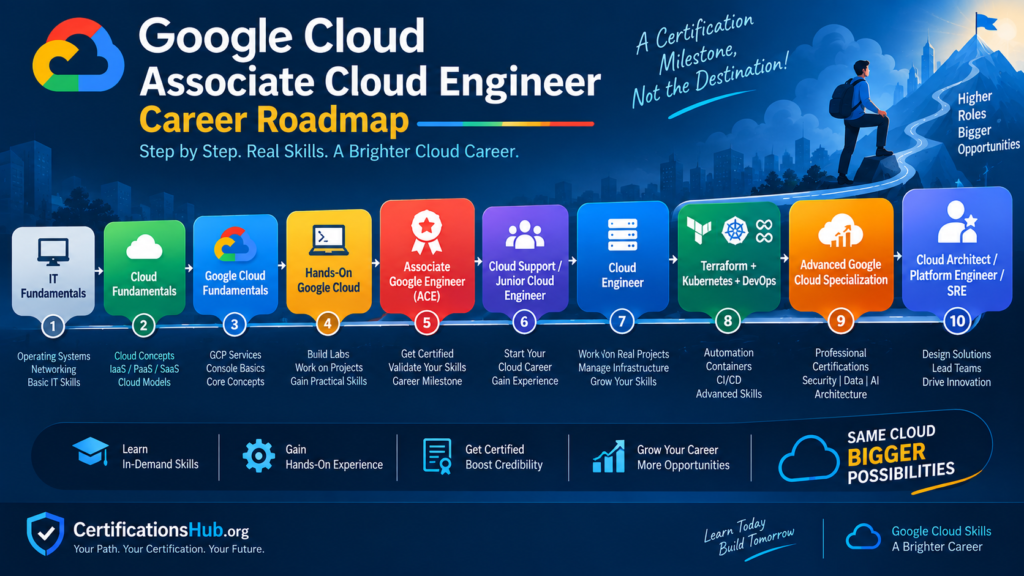
This roadmap is more realistic than treating ACE as a standalone career shortcut.
Key Takeaways
If you remember only a few things from this guide, remember these:
- Associate Cloud Engineer is a technical Google Cloud certification.
- The standard exam costs US$125 + applicable tax.
- The exam lasts 2 hours.
- There are 50–60 multiple-choice and multiple-select questions.
- There are no formal prerequisites.
- Google recommends 6+ months of hands-on Google Cloud experience.
- The certification is valid for 3 years.
- ACE focuses on deployment, operations, infrastructure, access and security.
- Hands-on labs are extremely important.
- Linux and networking skills can significantly improve your preparation.
- Terraform and Kubernetes are valuable skills to add after the fundamentals.
- ACE can help with a cloud career, but the certification alone does not guarantee a job or salary.
- Choose ACE if your target career is aligned with Google Cloud.
- Build projects that demonstrate what you can actually do.
- For long-term career growth, think beyond ACE toward DevOps, platform engineering, architecture, security or SRE.
Related Articles
Refer to to the other related cloud certifications.
- Google Cloud Digital Leader Certification: Exam, Cost, Salary & Career Guide (2026)
- Best Cloud Certifications for Beginners 2026: AWS, Azure & Google Cloud
- AWS Certified Cloud Practitioner (CLF-C02) Complete Guide (2026)
- AWS Solutions Architect Associate Certification: Exam, Cost, Salary & Career Guide (2026)
- AZ-900 Certification: Exam, Cost, Eligibility, Salary & Career Guide (2026)
- AZ-900 vs AWS Cloud Practitioner: Which Cloud Certification Is Better? (2026)
- AWS vs Azure Certification 2026: Complete Comparison of Cost, Salary & Career
- Google Cloud vs AWS vs Azure: Which Cloud Platform Is Best for Your Career?
Frequently Asked Question
Is Google Cloud Associate Cloud Engineer worth it in 2026?
Yes, especially if you want a technical career working with Google Cloud. The certification validates associate-level cloud deployment, operations and security skills, but it should be combined with practical experience.
Is Associate Cloud Engineer difficult?
It is more technical than a foundational cloud certification. Beginners without IT or cloud experience may find it challenging.
Is coding required for ACE?
You do not need to be an advanced programmer. However, command-line skills, scripting, automation and basic programming concepts can be useful for a cloud engineering career.
Do I need six months of experience to take the exam?
No. Six months is Google’s recommended hands-on experience, not a formal prerequisite.
How much does the ACE exam cost?
The standard exam costs US$125 plus applicable tax.
How many questions are on the ACE exam?
The standard exam contains 50–60 multiple-choice and multiple-select questions.
How long is the ACE exam?
The standard exam duration is 2 hours.
Does ACE expire?
Yes. The certification is currently valid for three years.
Can I take ACE without Cloud Digital Leader?
Yes. Cloud Digital Leader is not a prerequisite for ACE.
Should I do Cloud Digital Leader before ACE?
Only if you need additional cloud fundamentals. If you already have IT/cloud knowledge, you can prepare directly for ACE.
Is ACE better than AWS Cloud Practitioner?
They target different platforms and levels. ACE is a more technical associate-level certification, while AWS Cloud Practitioner is a foundational AWS certification.
Is ACE enough to become a Cloud Engineer?
Not by itself. You should also develop practical skills in Linux, networking, IAM, cloud infrastructure, Terraform, containers and monitoring.
Can ACE help me get a job?
It can strengthen your profile and demonstrate Google Cloud knowledge, but employers also evaluate hands-on skills, experience and other technical capabilities.
What salary can I expect after ACE?
There is no fixed “ACE salary.” Cloud Engineer salaries in India vary substantially. Current 2026 salary sources show averages ranging from roughly ₹7 lakh to ₹10.7 lakh annually, depending on the source and methodology.
Can freshers take ACE?
Yes. There is no formal prerequisite, although Google recommends six or more months of hands-on Google Cloud experience.
Is ACE good for AWS or Azure professionals?
Yes. Your existing cloud experience can make learning GCP easier, particularly around networking, IAM, compute and infrastructure concepts.
Which is better for a beginner: ACE or Cloud Digital Leader?
Cloud Digital Leader is better for broad cloud fundamentals. ACE is better if your goal is a technical Google Cloud engineering role.
What should I learn after ACE?
Consider:
– Terraform
– Kubernetes
– DevOps
– CI/CD
– Linux
– Networking
– Python
– Security
– Google Cloud Professional certifications
What Google Cloud certification comes after ACE?
The appropriate next certification depends on your career direction. Possible longer-term paths include Professional Cloud Architect, Professional Cloud DevOps Engineer, Professional Cloud Security Engineer and other specialized Google Cloud certifications.
Can ACE help me become a DevOps Engineer?
Yes, as a foundation. Add Git, CI/CD, Linux, containers, Kubernetes, Terraform and automation skills.
Can ACE help me become a Cloud Architect?
It can be an early step. Architecture roles generally require considerably more experience and deeper design skills. Google positions Professional Cloud Architect as an advanced certification for more experienced professionals.