

Introduction
The Google Business Intelligence Professional Certificate is an intermediate-level career certificate designed for learners who want to transform raw business data into meaningful insights through dashboards, reports, and data visualization. Offered through Coursera, this self-paced program focuses on business intelligence (BI), helping learners develop practical skills in SQL, data modeling, ETL (Extract, Transform, Load), and dashboard creation.
As organizations increasingly rely on data-driven decision-making, Business Intelligence professionals play a critical role in converting complex datasets into actionable insights that support executives, managers, and business teams.
Unlike the Google Data Analytics Professional Certificate, which emphasizes the complete analytics lifecycle, the Business Intelligence certificate concentrates on designing data models, building dashboards, and creating automated reporting solutions that help organizations monitor performance and make informed decisions.
In this guide, you’ll learn everything about the Google Business Intelligence Professional Certificate, including its curriculum, cost, duration, salary expectations, career opportunities, skills you’ll develop, and whether it’s worth pursuing in 2026.
Table of Contents
Quick Overview
| Feature | Details |
|---|---|
| Provider | |
| Platform | Coursera |
| Level | Intermediate |
| Duration | Approximately 2 Months (10 hours/week) |
| Learning Mode | Self-paced |
| Programming Required | Basic SQL |
| Certificate Awarded | Google Business Intelligence Professional Certificate |
| Final Assessment | Practical Projects |
| Prerequisites | Basic Data Analytics Knowledge Recommended |
| Best For | Data Analysts, BI Analysts, Business Analysts, Reporting Professionals |
What Is the Google Business Intelligence Professional Certificate?
The Google Business Intelligence Professional Certificate is an online program that prepares learners to design business intelligence solutions that help organizations make better decisions using data.
Instead of focusing heavily on statistical analysis or machine learning, this certificate teaches learners how to:
- Design data models
- Build business dashboards
- Create KPI reports
- Write SQL queries
- Automate reporting
- Develop interactive visualizations
- Support executive decision-making
Learners also gain practical experience using modern BI tools and industry best practices through real-world projects.
Why Learn Business Intelligence in 2026?
Every modern organization depends on business intelligence to understand performance, identify trends, measure KPIs, and improve operational efficiency.
Business Intelligence professionals help decision-makers answer questions such as:
- Which products generate the highest revenue?
- Which marketing campaigns perform best?
- Where are operational bottlenecks?
- Which customers are likely to churn?
- How can costs be reduced?
- Which regions are growing fastest?
As companies continue investing in analytics and AI, Business Intelligence professionals remain among the most in-demand technology specialists.
Learning Business Intelligence enables you to:
- Build executive dashboards.
- Create automated reports.
- Learn SQL and data modeling.
- Improve business decision-making.
- Visualize complex datasets.
- Work with large business databases.
- Prepare for BI Analyst roles.
Who Should Take This Certificate?
The Google Business Intelligence Professional Certificate is ideal for:
- Data Analysts
- Business Analysts
- Reporting Analysts
- Operations Analysts
- Financial Analysts
- Marketing Analysts
- Project Managers
- IT Professionals
- Working professionals interested in Business Intelligence
It is especially valuable for learners who already understand basic data analytics concepts.
Who Should Avoid This Certificate?
This certificate may not be suitable if you:
- Are completely new to data analytics.
- Want to learn machine learning.
- Need advanced Python programming.
- Prefer software development careers.
- Want an introductory analytics course.
Beginners should first complete the Google Data Analytics Professional Certificate before progressing to Business Intelligence.
Prerequisites
Google does not require formal prerequisites, but learners will benefit from having:
- Basic SQL knowledge
- Spreadsheet skills
- Fundamental data analytics concepts
- Analytical thinking
- Basic business knowledge
Previous dashboard experience is helpful but not required.
Course Curriculum
The certificate consists of several modules covering practical Business Intelligence concepts.
| Module | Topics Covered |
|---|---|
| Foundations of Business Intelligence | BI lifecycle, KPIs, business metrics |
| SQL for BI | Database querying and optimization |
| Data Modeling | Designing efficient data models |
| ETL Processes | Data extraction, transformation, and loading |
| Dashboard Development | Creating interactive dashboards |
| Business Reporting | Executive reporting and visualization |
| Capstone Project | End-to-end BI solution |
Each module combines video lessons, quizzes, practical labs, and portfolio-building projects.
Skills You’ll Learn
By completing the Google Business Intelligence Professional Certificate, you’ll develop technical and business skills used by Business Intelligence professionals.
Technical Skills
- SQL
- Data Modeling
- Dashboard Design
- Business Reporting
- KPI Development
- Data Visualization
- ETL Concepts
- Database Management
- Business Metrics
- Report Automation
Business Skills
- Decision Making
- Business Communication
- Analytical Thinking
- Problem Solving
- Stakeholder Management
- Executive Reporting
- Data Storytelling
- Strategic Analysis
Tools You’ll Learn
Throughout the certificate, learners gain experience with widely used Business Intelligence tools.
These include:
- SQL
- BigQuery
- Looker
- Looker Studio
- Google Sheets
- Spreadsheets
- Business Dashboards
- Data Warehousing Concepts
These technologies are widely used by Business Intelligence teams across industries.
Learning Format
The Google Business Intelligence Professional Certificate is delivered online through Coursera.
Learning activities include:
- Video lectures
- Interactive readings
- SQL exercises
- Dashboard projects
- Hands-on labs
- Case studies
- Practical assignments
- Portfolio project
Learners can study anytime using the flexible self-paced format.
Course Duration
Google estimates that learners studying approximately 10 hours per week can complete the certificate in around 2 months.
| Weekly Study Time | Estimated Completion |
|---|---|
| 5 Hours | 4 Months |
| 10 Hours | 2 Months |
| 15 Hours | 6 Weeks |
| 20 Hours | 1 Month |
The shorter duration makes this one of Google’s faster career certificates.
Course Cost
The Google Business Intelligence Professional Certificate is available through Coursera’s monthly subscription.
| Item | Details |
|---|---|
| Platform | Coursera |
| Payment Model | Monthly Coursera subscription |
| Free Trial | Usually available |
| Financial Aid | Available for eligible learners |
Completing the certificate sooner reduces the total subscription cost.
Assessment
The certificate uses continuous assessments rather than a traditional final examination.
Assessment methods include:
- SQL assignments
- Dashboard projects
- Data modeling exercises
- Practical labs
- Knowledge quizzes
- Business case studies
- Capstone project
Learners receive the Google Business Intelligence Professional Certificate after successfully completing all required coursework.
Difficulty Level
| Topic | Difficulty |
|---|---|
| Business Intelligence Fundamentals | ⭐⭐☆☆☆ |
| SQL | ⭐⭐⭐☆☆ |
| Data Modeling | ⭐⭐⭐☆☆ |
| Dashboard Development | ⭐⭐⭐☆☆ |
| Looker & Looker Studio | ⭐⭐⭐☆☆ |
| ETL Concepts | ⭐⭐⭐☆☆ |
| Capstone Project | ⭐⭐⭐⭐☆ |
Overall Difficulty: 3.5/5
The certificate is more advanced than beginner-level analytics courses but does not require extensive programming or machine learning knowledge. Learners with a basic understanding of SQL and data analytics should find the content manageable with regular practice.
Career Benefits
The Google Business Intelligence Professional Certificate prepares learners to transform raw business data into meaningful insights through dashboards, reports, and data models. As organizations increasingly adopt data-driven decision-making, Business Intelligence (BI) professionals have become essential across industries.
By completing this certificate, you can:
- Develop practical Business Intelligence skills.
- Learn SQL and data modeling.
- Build executive dashboards using modern BI tools.
- Improve data visualization and storytelling abilities.
- Gain hands-on experience through real-world projects.
- Build a professional portfolio for job applications.
- Prepare for Business Intelligence and reporting roles.
- Create a strong foundation for analytics leadership positions.
Salary Expectations
Business Intelligence professionals are among the highest-paid analytics specialists because they combine technical expertise with business decision-making skills.
| Job Role | Average Salary (India) | Average Salary (USA) |
|---|---|---|
| BI Analyst | ₹6–12 LPA | $75,000–$100,000 |
| Senior BI Analyst | ₹12–22 LPA | $100,000–$130,000 |
| BI Developer | ₹8–18 LPA | $90,000–$125,000 |
| Analytics Consultant | ₹15–30 LPA | $110,000–$145,000 |
| BI Manager | ₹20–40 LPA | $130,000–$170,000 |
Professionals who continue learning cloud analytics, Power BI, Tableau, or AI-driven analytics often enjoy even stronger career growth.
Career Opportunities
The Google Business Intelligence Professional Certificate prepares learners for a variety of analytics and reporting roles.
Common career paths include:
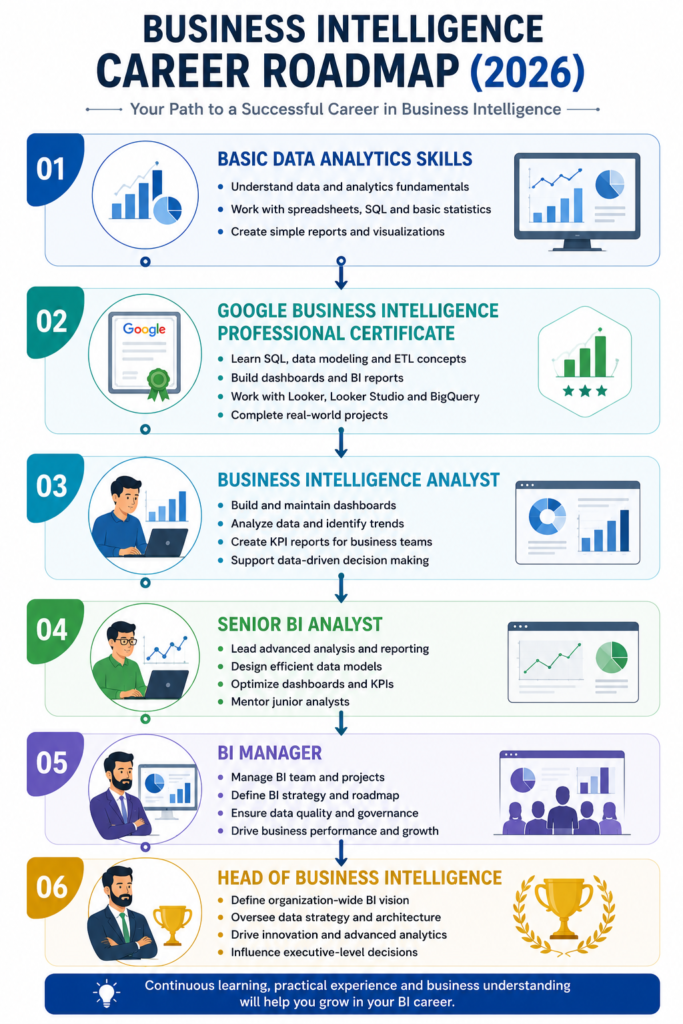
- Business Intelligence Analyst
- BI Developer
- Reporting Analyst
- Data Analyst
- Business Analyst
- Operations Analyst
- Analytics Consultant
- Dashboard Developer
- Decision Support Analyst
- Business Intelligence Manager
The certificate also serves as a stepping stone toward senior analytics and data engineering roles.
Business Intelligence Career Roadmap
Skills Employers Value
Organizations look for BI professionals who can combine technical knowledge with business understanding.
Technical Skills
- SQL
- BigQuery
- Looker
- Looker Studio
- Data Modeling
- ETL Processes
- Dashboard Development
- KPI Reporting
- Data Warehousing
- Business Intelligence
Professional Skills
- Analytical Thinking
- Business Communication
- Problem Solving
- Stakeholder Management
- Data Storytelling
- Decision Making
- Presentation Skills
- Strategic Thinking
Pros and Cons
Pros
- Industry-recognized Google certificate
- Strong focus on practical Business Intelligence
- Covers SQL, dashboards, and reporting
- Portfolio-building projects
- Flexible self-paced learning
- Excellent preparation for BI Analyst roles
- Complements Google Data Analytics
- High demand for BI professionals
Cons
- Not suitable for complete beginners
- Limited Python and machine learning coverage
- Requires SQL practice
- Monthly subscription cost can increase if learning is delayed
- Does not replace enterprise BI experience
Google Business Intelligence vs Google Data Analytics Professional Certificate
| Feature | Google Business Intelligence | Google Data Analytics |
|---|---|---|
| Level | Intermediate | Beginner |
| SQL | Advanced | Intermediate |
| Dashboard Development | Extensive | Moderate |
| Data Modeling | ✅ Yes | Basic |
| ETL Concepts | ✅ Yes | Limited |
| Machine Learning | ❌ No | ❌ No |
| Best For | BI Careers | Data Analyst Careers |
| Difficulty | ⭐⭐⭐⭐☆ | ⭐⭐⭐☆☆ |
Choose Google Business Intelligence if:
- You enjoy dashboards and reporting.
- You want to become a BI Analyst.
- You already understand analytics basics.
- You want to work closely with business stakeholders.
Choose Google Data Analytics if:
- You’re completely new to analytics.
- You want a broader introduction to the analytics lifecycle.
- You need to build foundational SQL and data analysis skills first.
4-Week Study Plan
| Week | Focus Area |
|---|---|
| Week 1 | Business Intelligence fundamentals, KPIs, SQL |
| Week 2 | Data Modeling, BigQuery, ETL concepts |
| Week 3 | Looker, Looker Studio, Dashboard Development |
| Week 4 | Capstone Project, Portfolio Building, Revision |
Studying 10–15 hours per week provides enough time to understand concepts while completing practical exercises.
Best Learning Resources
Supplement the certificate with these resources:
- Google Cloud Skills Boost
- Looker Documentation
- Looker Studio Help Center
- BigQuery Documentation
- SQLBolt
- Mode Analytics SQL Tutorial
- Kaggle
- Google Cloud Learning
Preparation Tips
- Refresh your SQL fundamentals.
- Practice writing SQL queries daily.
- Build sample dashboards using public datasets.
- Learn common business KPIs.
- Understand dimensional data modeling concepts.
- Complete every hands-on project.
- Publish dashboard screenshots in your portfolio.
- Practice presenting business insights clearly.
Common Mistakes to Avoid
- Memorizing SQL syntax without practice.
- Ignoring dashboard design principles.
- Skipping the capstone project.
- Focusing only on technical skills without business context.
- Using too many charts in dashboards.
- Not validating data before reporting.
- Forgetting to build a professional portfolio.
Final Verdict
The Google Business Intelligence Professional Certificate is an outstanding choice for professionals who want to specialize in dashboards, reporting, SQL, and data-driven business decision-making. It complements the Google Data Analytics Professional Certificate by focusing more deeply on business intelligence concepts, data modeling, and executive reporting.
For aspiring BI Analysts, Reporting Analysts, Business Analysts, and Analytics Consultants, this certificate provides practical, job-ready skills that are relevant across industries. When combined with strong SQL skills, a portfolio of dashboards, and experience using Looker or Looker Studio, it can significantly improve career prospects.
Rating: ⭐⭐⭐⭐⭐ (4.8/5)
Recommended for: Data analysts, business analysts, reporting professionals, IT professionals, and anyone looking to build a career in Business Intelligence.
Key Takeaways
- Intermediate-level Google Career Certificate.
- Focuses on SQL, dashboards, data modeling, and reporting.
- Covers Looker, Looker Studio, BigQuery, and BI concepts.
- Includes hands-on projects and portfolio development.
- Ideal for aspiring Business Intelligence Analysts.
- Excellent progression after the Google Data Analytics Professional Certificate.
- Flexible, self-paced learning on Coursera.
Related Articles
Refer to the other related articles here.
- Google Data Analytics Professional Certificate
- Google Advanced Data Analytics Professional Certificate
- Google AI Essentials
- Google Prompting Essentials
- Google Project Management Professional Certificate
- Google Digital Marketing & E-commerce Professional Certificate
- Best Data Analytics Certifications
- Best Google Certifications
Frequently Asked Questions (FAQs)
Is the Google Business Intelligence Professional Certificate worth it in 2026?
Yes. It is one of the best intermediate-level certificates for professionals interested in Business Intelligence, dashboards, reporting, and data-driven decision-making.
Do I need programming experience?
No. Basic SQL knowledge is helpful, but advanced programming experience is not required.
Does the certificate teach Looker?
Yes. Learners gain practical experience with Looker and Looker Studio, two widely used Business Intelligence tools.
How long does it take to complete?
Google estimates approximately 2 months with around 10 hours of study per week.
Is SQL included?
Yes. SQL is one of the primary technical skills covered throughout the certificate.
Can this certificate help me become a BI Analyst?
Yes. It prepares learners for entry-level and intermediate Business Intelligence and reporting roles.
Does the certificate expire?
No. The Google Business Intelligence Professional Certificate does not currently have an expiration date.